
eBrief Ready can automatically scan a matter and identify any documents that have been uploaded more than once. This helps you keep your matter clean and avoid confusion when working with large document sets.
Identifying duplicates #
- Open the matter and click Actions in the top right corner
- Click Identify Duplicates
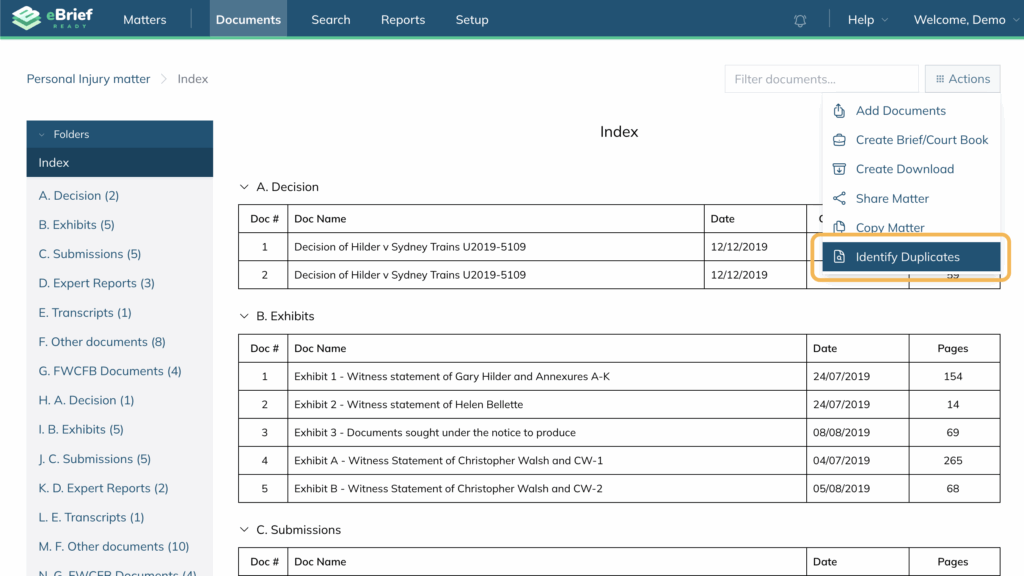
eBrief Ready will scan the matter to identify and group duplicate documents. This allows you to quickly review and manage any files that appear more than once.
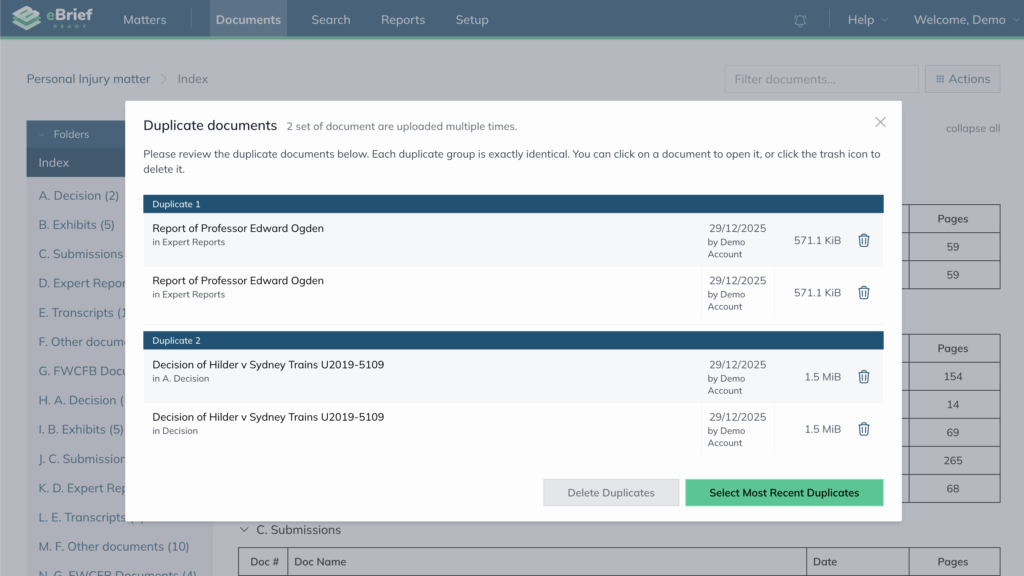
Reviewing and removing duplicates #
After identifying duplicates, you click any document to view it or choose one of the following options:
Select Most Recent Duplicates — the system automatically selects all newer copies within a group while leaving the oldest (original) documents unselected. This helps you identify the original document and distinguish it from copies added later.
Delete individually — click the trash icon next to any document to remove it manually.

Deleting duplicates #
- Once you have confirmed which documents to remove, click Delete Duplicates
- A confirmation prompt will appear — click OK to confirm the deletion

Note: Deleted documents are moved to the Recycle Bin and permanently removed after the retention period set by your administrator expires.
For further information or assistance, please do not hesitate to reach out to our dedicated Support Team via support@legalready.ai or +61 3 9020 4456.