
Naming your files consistently before uploading to eBrief Ready helps the system automatically extract key information and organise your documents. Only the file name is mandatory, but including a date and document type is recommended.
Recommended format #
Document name — Date — Document type — Number (optional)
Examples:
- Michael Davis 2015-12-01 Exhibit.pdf
- Michael Davis 2015-12-01 Exhibit 55.pdf
The following document types are supported for automatic importing: Exhibit, Transcript, Authority, Deposition, Expert Report and Witness Statement. Including one of these types in your file name allows eBrief Ready to automatically identify and categorise the document on upload.
Transcripts #
For transcripts, include the word “Transcript” and a number. A page range can also be added if needed.
Examples:
- Able Demolitions 2015-12-09 Transcript 2.pdf
- LONG 2015-09-30 Transcript 2 Page 35-60.pdf
QLD Commercial List format #
For the QLD Commercial List, use the following format:
Document number — Document name — Document date
Examples:
- BS1234.16 statement of claim 01.12.16.pdf
- BS1234.16 defence 01.12.16.pdf
- BS1234.16 reply and answer 01.12.16.pdf
Date extraction #
The system automatically extracts dates from file names. Valid formats include:
- DD-MM-YYYY
- DD.MM.YYYY
- YYYY-MM-DD
- YYYY.MM.DD
- DD Month YYYY
Dates are extracted when placed at the beginning or end of the file name, or after the words Dated or Filed.
If a file name contains a date range, the system will extract both dates when they are separated by a dash or the word “to”.
Examples:
- Citibank Visa statement John Smith 07.05.13-07.08.13.pdf
- Citibank Visa statement John Smith 07-05-13 to 07-08-13.pdf
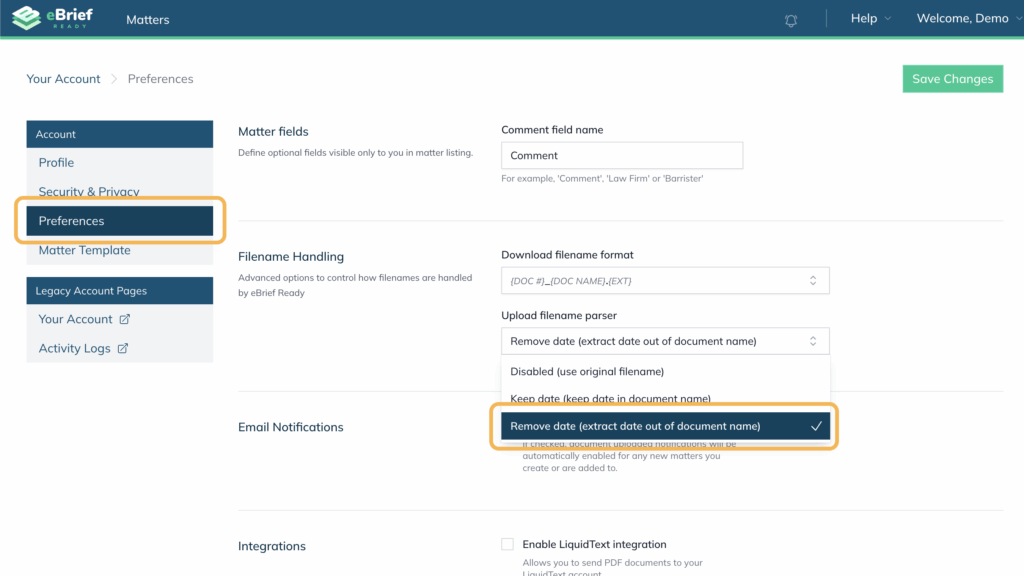
Note: To keep the date in the document name, go to Your Account → Preferences → Document Uploads and change the Filename parser to Keep date.
For further information or assistance, please do not hesitate to reach out to our dedicated Support Team via support@legalready.ai or +61 3 9020 4456.