
eBrief Ready can automatically classify credit card and bank statements on upload. The system extracts the credit card number, bank account number, bank account name and statement period, then places the statement in the correct bank account folder — which is automatically created for you.
Step 1: Create a bank statements folder
Before uploading, you need to set up a folder with the bank statements folder type enabled.
- Click the edit icon on the right hand side of the matter name to open matter settings
- Select Folders from the left hand menu
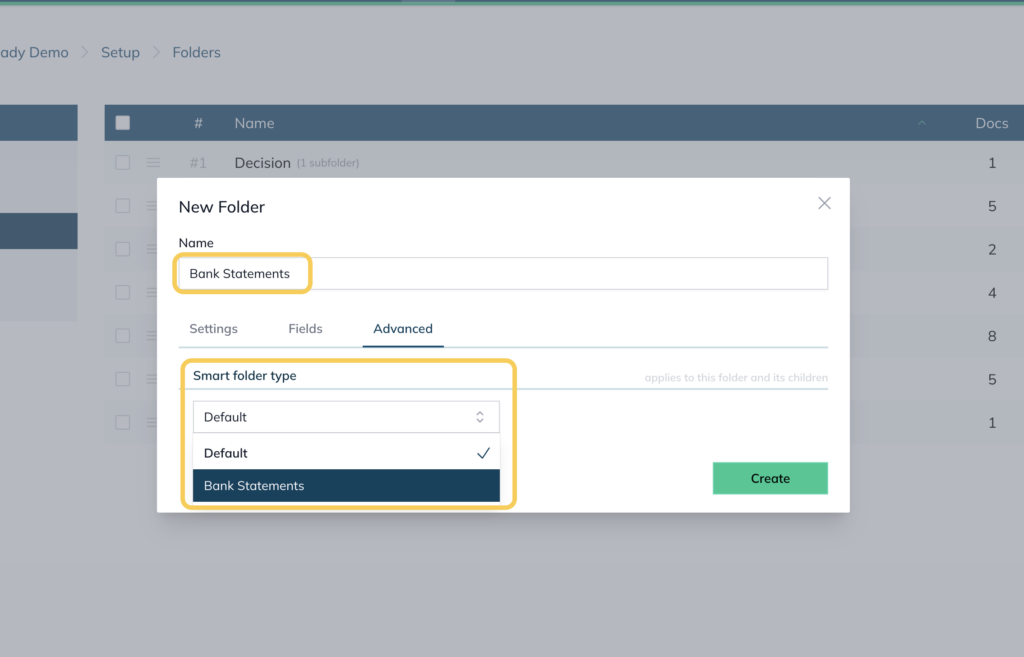
- Click New Folder in the top right corner
- Name the folder (eg Bank Accounts or Bank Statements
- Go to the folder’s Advanced settings
- Under Smart folder type, select Bank Statements
- Click Create
You can sort this new folder to any position in your folder list.
Step 2: Upload bank statements
- Go to the Documents tab
- Click Actions in the top right corner and select Add Documents
- Upload your bank statements into the bank statements folder
The AI will automatically:
- Update the document name with the bank name in the index
- Update the date to match the date range of the bank statement
- Highlight any missing bank statements and their date range
eBrief Ready has options for Barrister Chambers and Community Legal Centres at attractive rates. Contact support@legalready.ai for more information.